NetoMeter Blog
Main Site >>
NetoMeter Blog
NetoMeter Blog
Latest Videos
  • Home
  • Windows Server
  • Exchange Server
  • SharePoint
  • Tools
    • ACMEExchange Client
Main Site >>
Tuesday, November 10, 2026
NetoMeter Blog
NetoMeter Blog
  • Main Site >>
  • Home
  • Windows Server
  • Exchange Server
  • SharePoint
  • Latest Videos
  • Upcoming
Main Site >>

©2024 NetoMeter All Right Reserved.
Exchange Server 2007Exchange Server 2010

Screencast: Exchange 2007 – Exchange 2010 Upgrade Part 2

by admin December 8, 2012

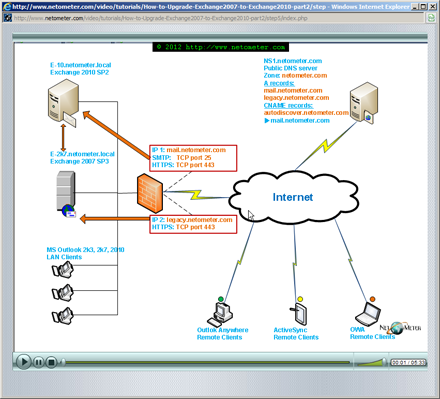
This is the second (and last) part of our  step-by-step video tutorial, which demonstrates how to upgrade Exchange 2007 to Exchange 2010 Sp2. In Part 1, we’ve been preparing the existing network and introducing Exchange 2010 SP2 into it.

In Part 2, we continue with moving all resources and decommissioning Exchange 2007 server.  As usual, we follow our Step-by-step approach, where the whole upgrade is split into seven steps.

Screencast: How to Upgrade from Exchange 2007 to Exchange 2010 Part 2

The first three steps prepare the ground for moving all resources to Exchange 2010:

Click to watch the Screencast Step 1 – Replicate Public Folders and move OAB generation server.

Click to watch the Screencast Step 2 – Generate and submit a CSR for a new SSL certificate to GoDaddy.com.

Click to watch the Screencast Step 3 – Install the new Certificate on Exchange 2010 and Exchange 2007 servers.

The mail flow and client connectivity should remain intact at this point. As you will see in the next two steps – good preparation and timing is crucial for minimizing downtime when changing the mail flow and remote client connectivity:

Click to watch the Screencast Step 4 – Change the mailflow through Exchange 2010 server.

Click to watch the Screencast Step 5 – Change remote client access – OWA, Outlook Anywhere and ActiveSync.

Moving the mailboxes to Exchange 2010 server can take a significant amount of time. You should be prepared for different scenarios, including troubleshooting failed move requests and automatically suspending moves to minimize the impact on the end users:

Click to watch the Screencast Step 6 – Move the mailboxes – troubleshoot failed move requests, automatically suspend moves and complete them after hours.

And the last step is moving all Public Folder replicas to Exchange 2010 and uninstalling the legacy server:
Click to watch the Screencast Step 7 – Remove Exchange 2007 Mailbox and Public folder DB and uninstall Exchange 2007 server.

Tweet #Exchange2010SP2 Follow @netometer

Stay tuned on NetoMeter – subscribe to NetoMeter RSS.

Dean
0 FacebookTwitterPinterestLinkedinWhatsappTelegramViberEmail
Small Business Server 2011

How to Add a Trusted Certificate in SBS 2011. Installing StartSSL Free One Year Class 1 Certificate.

by admin October 21, 2012

Many organizations are still running Exchange 2007, and it comes as no surprise that transitioning from Exchange 2007 to Exchange 2010 SP2 is one of the hot upgrades nowadays.

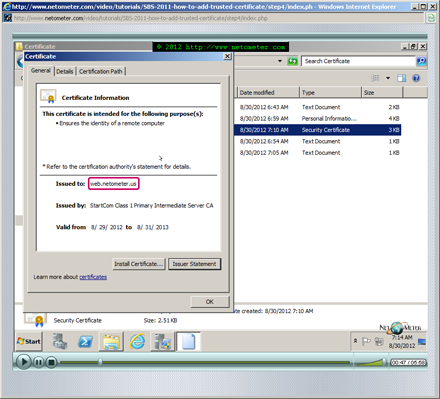
In the following video tutorial, we demonstrate how to generate a Certificate signing request in SBS 2011, how to create a StartSSL account, and how to install and test your trusted SSL certificate. As you will see, the validation process at StartSSl web site is fully automated; only the ownership of the domain name, resp. email address are validated, hence the free certificate availability. There is a catch, though. Revoking a StartSSL certificate is not free. For example, if your server crashes, and you need to reissue the certificate, first you have to send a revocation request for the existing one. That process requires human intervention and StartSSL charges a moderate price for it (currently $24.99 USD). Backing up your SSL certificate in this case is crucial, and we demonstrate in our last step, how to export it (with your private key) to a PFX file.

Screencast: How to Add a Trusted Certificate in SBS 2011. Installing StartSSL Free One Year Class 1 Certificate

Tweet #SBS2011 Follow @netometer

Stay tuned on NetoMeter – subscribe to NetoMeter RSS.

Dean

0 FacebookTwitterPinterestLinkedinWhatsappTelegramViberEmail
Exchange Server 2007Exchange Server 2010

How to Upgrade from Exchange 2007 to Exchange 2010

by admin August 21, 2012

You can find Part 2 of this Screencast here.

Many organizations are still running Exchange 2007, and it comes as no surprise that transitioning from Exchange 2007 to Exchange 2010 SP2 is one of the hot upgrades nowadays.

In the following video tutorial, we demonstrate how to upgrade Exchange 2007 to Exchange 2010 Sp2.

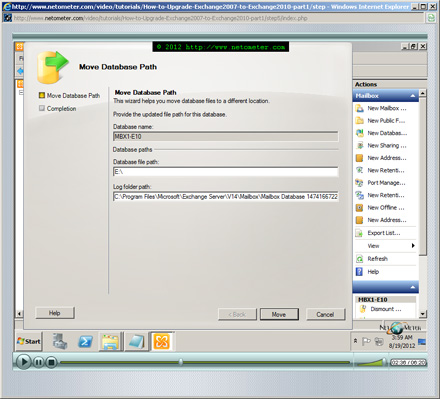
To be able to keep our detailed step-by-step approach and make it easier for you to follow, we have split this screencast in two parts. In Part 1, we focus our attention on the required health checks and preparation of Active Directory and Exchange 2007 organization. You will see a typical Exchange 2010 SP2 installation on a member server running Windows Server 2008 R2 SP1 (SP1 ended the nightmare of searching required updates and patches). Strategically, after completing part 1, you will have an Exchange 2010 SP server introduced into your existing Exchange 2007 Organization, without interrupting and changing the mail flow. As you will find out, Exchange setup does not ask to create Public Folder database when you are adding Exchange 2010 to an existing Exchange 2007 organization, even if you have Public Folders in use. Creating a public folder Database, renaming the existing Mailbox database and relocating database and log files to different volumes are some of the tasks which we demonstrate in Part 1.

Screencast: How to Upgrade from Exchange 2007 to Exchange 2010

Tweet #Exchange2010SP2 Follow @netometer

Stay tuned on NetoMeter – subscribe to NetoMeter RSS.

Dean

0 FacebookTwitterPinterestLinkedinWhatsappTelegramViberEmail
Exchange Server 2010Free Screencasts

Screencast: How to Reduce Downtime When Installing Rollup Updates in Exchange 2010

by admin June 13, 2012

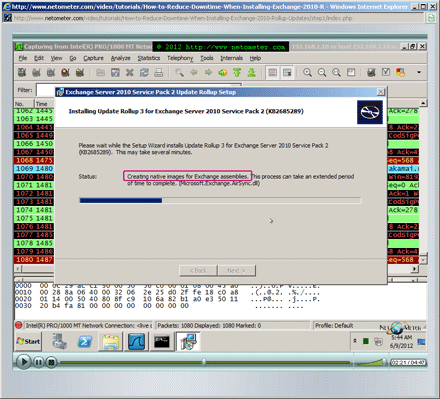
We’ve already posted in our blog that installing Rollup Updates for Exchange Server 2010 can take a considerable amount of time. Most of this time is spent when Native Image Generator (NGEN) is creating native images for Exchange Assemblies. While this process is taking place, Exchange services are stopped and disabled, and correspondingly – Exchange server is not available.

Taking a closer look reveals that a huge number of connections to Microsoft’s Certificate Revocation Server are being established in the background.  As a result, the installation of the Rollup Updates slows down. Surprisingly, the reason for this behavior is Internet Explorer, and more precisely, one of its advanced settings – Check for Publisher’s Certificate Revocation.

As you will see in the following video tutorial, disabling the option Check for Publisher’s Certificate Revocation in IE significantly reduces Rollup Updates installation time/Exchange downtime.

Screencast: How to Install and Configure Search Server 2010 Express

Tweet #Exchange2010SP2 Follow @netometer

Stay tuned on NetoMeter – subscribe to NetoMeter RSS.

Dean
0 FacebookTwitterPinterestLinkedinWhatsappTelegramViberEmail
SharePoint

Screencast: How to Install and Configure Search Server 2010 Express

by admin June 4, 2012

SharePoint Foundation 2010 is the free version of SharePoint Server 2010, and a lot of companies find it a suitable choice for their intranet. As a free version, it has a serious limitation – you get only basic search capabilities; no search suggestions, best bets, quick filtering, search in PDF files etc.

And here comes a big surprise – Search Server 2010 Express. Judging by its name, you would never guess that it is the good old SharePoint Foundation 2010, with Enterprise Search Capabilities. Sometimes, you might see it described as SharePoint Foundation on steroids.

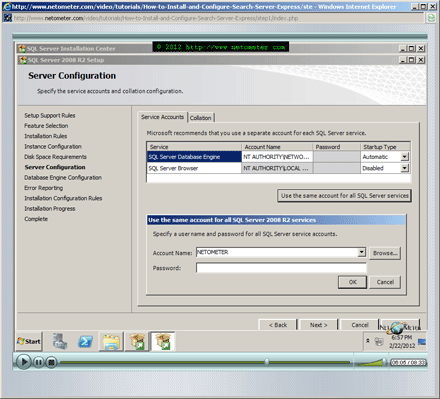
Most of the SharePoint installation instructions which you will find on the Internet, comfortably skip the installation and configuration of SQL server. In this step-by-step Screencast, we start with the installation and configuration of SQL Server 2008 R2 Express with SP1.

In the following Step-by-Step video tutorial, we demonstrate the installation and initial configuration of Search Server 2010 Express. You will see how to prepare Search Server 2010 Express installation disk with the required updates, and how to slipstream SP1 and the latest SharePoint cumulative update into your installation package. That will save you the trouble of running again SharePoint Farm Configuration wizard later, after applying SP1 on a live SharePoint server.

Screencast: How to Install and Configure Search Server 2010 Express

Tweet #Sharepoint2010 Follow @netometer

Stay tuned on NetoMeter – subscribe to NetoMeter RSS.

Dean

0 FacebookTwitterPinterestLinkedinWhatsappTelegramViberEmail
Windows Server 2008

Installed “Update Rollup 3 for Exchange 2010 SP2”- Downtime about 40 minutes

by admin May 30, 2012

Update: How to Reduce Downtime When Installing Rollup Updates in Exchange 2010

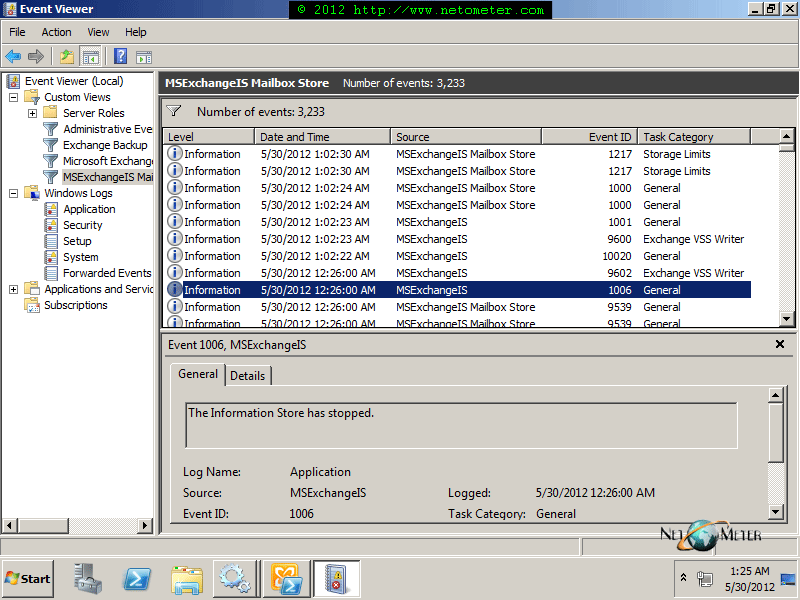
We’ve tested today Update Rollup 3 for Exchange 2010 Service Pack 2. The installation took about 40 minutes. Exchange services are stopped and disabled while the installation takes place, so be prepared for downtime:

Update Rollup 3 for Exchange 2010 Service Pack 2

Update Rollup 3 for Exchange 2010 Service Pack 2

Tweet #Exchange2010SP2 Follow @netometer

0 FacebookTwitterPinterestLinkedinWhatsappTelegramViberEmail
Exchange Server 2010

Screencast: How to Enable and Use Single Item Recovery in Exchange 2010

by admin May 14, 2012

One of the often overlooked features in Exchange 2010 is Single Item Recovery. The ability to recover quickly deleted items, without restoring a database from point in time backup has been present in Exchange for quite a while.

From the End-user’s perspective, you see the same graphical interface and it is easy to assume, that you are dealing with the same plain old Dumpster and Recover Deleted Items in Microsoft Outlook or Outlook Web App. Moreover, the enhanced Dumpster functionality is not enabled out of the box, and nothing in Exchange Management Console suggests about its availability.

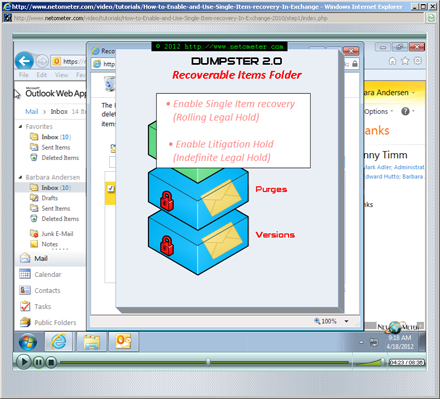
In reality, the whole concept about the dumpster has been updated and in Exchange 2010 we get a totally redesigned Dumpster version 2.

In the following Step-by-Step video tutorial, we demonstrate how to enable, configure and use Single Item recovery in Exchange 2010. As you will see, once the Purges and Versions subfolders come into play, we get the so called Immutability in Exchange 2010:
– When the end-user purges an item, it is not removed from the mailbox but simply placed in the Purges subfolder, where it is kept for the specified by us retention period.
– When an item is modified, Copy-on-write protection takes place and a copy of the original item is placed in the Versions subfolder.
– Dumpster content (Recoverable Items Folder) is indexable and we can use Multi-mailbox search to find items based on predefined criteria.

How to Enable and Use Single Item Recovery in Exchange 2010

Stay tuned on NetoMeter – subscribe to NetoMeter RSS.

Dean
0 FacebookTwitterPinterestLinkedinWhatsappTelegramViberEmail
SharePoint

How to Start and Configure SharePoint Foundation 2010 Search

by admin February 2, 2012

SharePoint Foundation 2010 is a free version of SharePoint 2010, which makes it a reasonable choice for many organizations. In time, the amount of information in SharePoint might become overwhelming, and finding what you need might be rather difficult. This is where the built-in SharePoint Foundation 2010 search engine comes into play.

It is important to know, that even though Search Service is automatically installed with SharePoint 2010 Foundation, out of the box the Search Service is not started and configured.

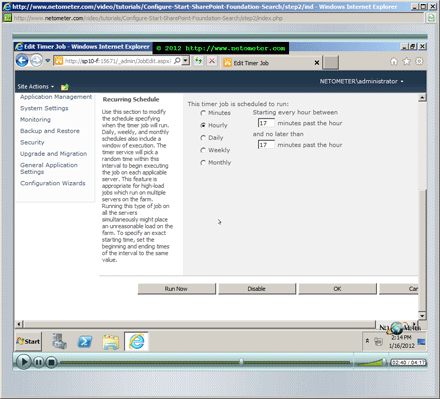
In the following Step-by-Step video tutorial, we demonstrate how to start and configure SharePoint Foundation Search.

How to Start and Configure SharePoint Foundation 2010 Search

Stay tuned on NetoMeter – subscribe to NetoMeter RSS.

Dean

0 FacebookTwitterPinterestLinkedinWhatsappTelegramViberEmail
Office 365

How to Create and Customize SharePoint Sites in Office 365. Importing and Exporting Site Templates

by admin December 9, 2011

SharePoint Online is one of the services delivered by Office 365.

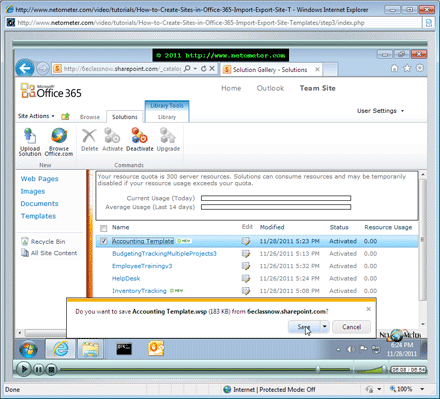
In the following Step-by-Step video tutorial, we demonstrate how to plan the sites and subsites in your SharePoint site collection. You will see how to create and customize a subsite, so it fits better your team needs. In addition, you will learn how to import new site templates to the existing set of SharePoint site templates, and how to save and export an existing SharePoint site as a template.

How to Create and Customize SharePoint Sites in Office 365. Importing and Exporting Site Templates

Stay tuned on NetoMeter – subscribe to NetoMeter RSS.

Dean
0 FacebookTwitterPinterestLinkedinWhatsappTelegramViberEmail
Exchange Server 2010

How to Renew Exchange 2010 Trusted (Commercial) SSL Certificate

by admin November 21, 2011

In this Screencast, we will show you how to renew an existing Exchange 2010 SSL certificate. We are using a GoDaddy Multiple Domain (UCC) certificate, but the instructions are exactly the same when renewing a single domain SSL certificate.

Some people prefer the graphical user interface – Exchange Management Console, while other specialists favor the command line – Exchange Management Shell. We address both approaches in our Screencasts, when generating the CSR (Certificate Signing Request).
First, we will show you how to generate a renewal CSR in Exchange Management Console, by using the Renew Exchange Certificate option. Most Exchange administrators hit a problem when using this option and we discuss in details how to generate the CSR with the correct encoding.
Another way to generate a CSR, when renewing Exchange 2010 trusted SSL certificate, is using Exchange Management Shell, and we demonstrate this approach too.

At the end of our Step-by-Step video tutorial, we demonstrate how to export an SSL certificate to a PFX (Personal Information Exchange) file, which can be used later to restore the certificate or install it on a different server.

How to Install and Configure Exchange 2010 Edge Transport Server

Stay tuned on NetoMeter – subscribe to NetoMeter RSS.

Dean

0 FacebookTwitterPinterestLinkedinWhatsappTelegramViberEmail
Newer Posts
Older Posts
November 2026
M T W T F S S
 1
2345678
9101112131415
16171819202122
23242526272829
30  
« Nov    

NetoMeter Blog

  • Video Updates
  • Upcoming Videos
  • Community Chatrooms
  • Community Forum
Facebook Twitter Rss Envelope

Useful Links

    • Contact Us
    • Collaboration
    • Adverstising
    • Privacy Policy
    • Feedback
    • Terms of Use
    • Help & Support
    • News Covering
    • Trending Now

Edtior's Picks

ACMEExchange Let’s Encrypt Client: How to Install a LE Certificate in Exchange Server
Coming Soon: How to Migrate File Servers to Server 2022
Screencast (Part 2): How to Upgrade from Exchange 2013 to Exchange 2019

Latest Articles

ACMEExchange Let’s Encrypt Client: How to Install a LE Certificate in Exchange Server
Coming Soon: How to Migrate File Servers to Server 2022
Screencast (Part 2): How to Upgrade from Exchange 2013 to Exchange 2019
Screencast: How to Upgrade from Exchange 2013 to Exchange 2019
NetoMeter Blog
  • Home
  • Windows Server
  • Exchange Server
  • SharePoint
  • Tools
    • ACMEExchange Client
NetoMeter Blog
  • Main Site >>
  • Home
  • Windows Server
  • Exchange Server
  • SharePoint
  • Latest Videos
  • Upcoming
©2024 NetoMeter All Right Reserved.