NetoMeter Blog
Main Site >>
NetoMeter Blog
NetoMeter Blog
Latest Videos
  • Home
  • Windows Server
  • Exchange Server
  • SharePoint
  • Tools
    • ACMEExchange Client
Main Site >>
Wednesday, November 11, 2026
NetoMeter Blog
NetoMeter Blog
  • Main Site >>
  • Home
  • Windows Server
  • Exchange Server
  • SharePoint
  • Latest Videos
  • Upcoming
Main Site >>

©2024 NetoMeter All Right Reserved.
Windows Server 2008

What’s coming next – MOODLE and phpBB

by admin July 12, 2008

What’s coming next in our Step-by-Step video series about running the most popular PHP and MySQL based applications on IIS7, Windows Server 2008?

MOODLE – one of the best course management systems for online learning on the web. The number of schools, colleges, universities and companies, using Moodle is expanding fast. There is a staggering amount of modules and pluggins for Moodle – like Gradebook, Google translator, Amazon Associates, adding flash created video courses etc.

phpBB – do I have to present the most popular forum solution on the WEB.

Windows Server 2008 is a great platform to run these applications.

The videos are coming!!!

Stay tuned on NetoMeter and subscribe to NetoMeter Screencasts RSS

Dean

0 FacebookTwitterPinterestLinkedinWhatsappTelegramViberEmail
Windows Server 2008

MediaWiki on IIS7, Windows Server 2008 (PHP using FastCGI and MySQL)

by admin July 11, 2008

The next Step-by-Step video in our Screencast series about running PHP and MySQL popular applications on IIS7 is going to be MediaWiki on IIS7.

MediaWiki on IIS7, FastCGI, PHP, MySQL

Dean

0 FacebookTwitterPinterestLinkedinWhatsappTelegramViberEmail
Windows Server 2008

How to Install WordPress (MySQL and PHP using FastCGI) on IIS7. Windows Server 2008

by admin July 10, 2008

The interest about installing and running PHP and MySQL based applications on IIS7 is extraordinary. We have started a Screencast series on NetoMeter demonstrating the intsallation and configuration of some of the most popular PHP and MySQL based applications on Windows Server 2008.

In the following Screencast we are presenting the Step-by-Step video about WordPress – the most popular blog tool and WebLog platform:

How to Install WordPress on IIS7, Windows Server 2008

Dean

0 FacebookTwitterPinterestLinkedinWhatsappTelegramViberEmail
OldiesSmall Business Server 2008

Bare-metal restore of Windows Server 2008 to new hardware, using Windows Server Backup

by admin July 10, 2008

Recently I covered in a Step-by-Step video tutorial, the new Windows Server Backup features in Windows Server 2008.

I also demonstrated in another Screencast the Bare-Metal restore of Windows Small Business Server 2008 (using Windows Server Backup).

I got a question on Neto-Chat: Can you perform Bare-Metal restore of Windows Server 2008 to a different hardware using Windows Server Backup.

I haven’t tried this and I am testing it at the moment. As usually, the results will be posted as a Step-by-Step video tutorial.

The question has an interesting twist. Can you restore Windows Server 2008 running on a physical machine, to a virtual machine. For example you might want to backup a server running in a production environment or duplicate it in a test network.

What about the opposite – moving an installation of Windows Server 2008 from a Virtual Machine, to a physical one.

The videos are coming!!!

Stay tuned on NetoMeter – subscribe to our Screencasts RSS and be one of the first to watch and comment them.

Dean

0 FacebookTwitterPinterestLinkedinWhatsappTelegramViberEmail
Windows Server 2008

MySQL, PHP with FastCGI and Joomla on Windows Server 2008

by admin July 9, 2008

I got a question on Neto-Chat regarding the installation of Joomla in IIS7. More specifically, the question was about errors when configuring Joomla on Windows Server 2008. When I dug around it turned out that there is a lot of contradicting information about the process of installing and configuring MySQL and PHP based applications in IIS7. In addition the situation gets more complicated because there is a difference when you do this on a x32 and on a x64 platform.

In short, I decided to demonstrate in a series of Screencasts the whole process of installing some of the most popular PHP and MySQL based applications (bot on x32 and x64 platforms) – starting with Joomla! and Wordpress.

The first video tutorial is about installing Joomla! on Windows Server 2008.

Joomla in IIS7 

A separate video step is dedicated for the installation and configuration of:

  • IIS7 (Web Server Role in Windows Sevrer 2008)
  • MySQL
  • PHP using FastCGI – this is the recommended approach in IIS7 as it combines both performance and stabilty. In addition we are using the non-thread-safe PHP package which improves additionally the perfromance.
  • Joomla! ininitial installation

Just get the packages which you see in the video, follow the detailed steps and you will have in no time a working Joomla on your Server.

Enjoy it!

Dean

0 FacebookTwitterPinterestLinkedinWhatsappTelegramViberEmail
Small Business Server 2008

SBS 2008 – Backup to Network Share

by admin July 5, 2008

If you are running SBS 2008 you might be surprised to find out the the backup section in SBS console does not allow you to backup to Network Share. There are many cases when you might need to use that approach.

The following ScreenCast at NetoMeter demonstrates how to perform backup to Network Share in SBS 2008:

How to Backup SBS 2008 to network Share

0 FacebookTwitterPinterestLinkedinWhatsappTelegramViberEmail
Small Business Server 2008

Windows Server 2008 Backup in SBS 2008

by admin June 26, 2008

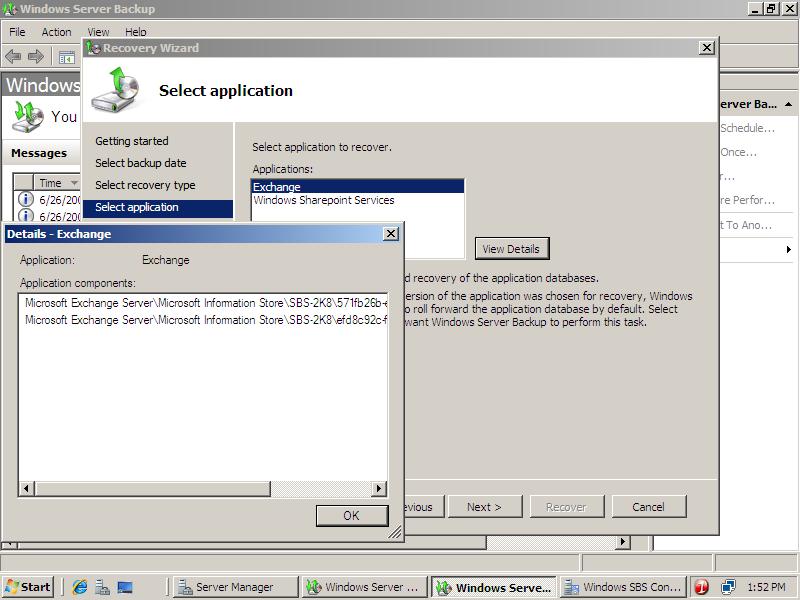
I was pleasantly surprised to find out that the version of Windows Server 2008 backup included in SBS 2008 is significantly improved.

There were a lot of ramblings on the Net about the missing option to recover Exchange 2007 running on Windows Server 2008.

Not anymore. Besides the options to recover separate files and volumes, now you can backup and restore applications like Exchange and Sharepoint services. Here is a snapshot:

Backup and Restore Exchange 2007 using Windows Server 2008 backup

Watch the high quality, audio enabled screencasts about backup and recovery of Exchange 2007 server in Windows Server 2008 / SBS 2008 at NetoMeter

0 FacebookTwitterPinterestLinkedinWhatsappTelegramViberEmail
Newer Posts
Older Posts
November 2026
M T W T F S S
 1
2345678
9101112131415
16171819202122
23242526272829
30  
« Nov    

NetoMeter Blog

  • Video Updates
  • Upcoming Videos
  • Community Chatrooms
  • Community Forum
Facebook Twitter Rss Envelope

Useful Links

    • Contact Us
    • Collaboration
    • Adverstising
    • Privacy Policy
    • Feedback
    • Terms of Use
    • Help & Support
    • News Covering
    • Trending Now

Edtior's Picks

ACMEExchange Let’s Encrypt Client: How to Install a LE Certificate in Exchange Server
Coming Soon: How to Migrate File Servers to Server 2022
Screencast (Part 2): How to Upgrade from Exchange 2013 to Exchange 2019

Latest Articles

ACMEExchange Let’s Encrypt Client: How to Install a LE Certificate in Exchange Server
Coming Soon: How to Migrate File Servers to Server 2022
Screencast (Part 2): How to Upgrade from Exchange 2013 to Exchange 2019
Screencast: How to Upgrade from Exchange 2013 to Exchange 2019
NetoMeter Blog
  • Home
  • Windows Server
  • Exchange Server
  • SharePoint
  • Tools
    • ACMEExchange Client
NetoMeter Blog
  • Main Site >>
  • Home
  • Windows Server
  • Exchange Server
  • SharePoint
  • Latest Videos
  • Upcoming
©2024 NetoMeter All Right Reserved.