

 nm-admin
 SBS 2011 CIW Screencast is available here
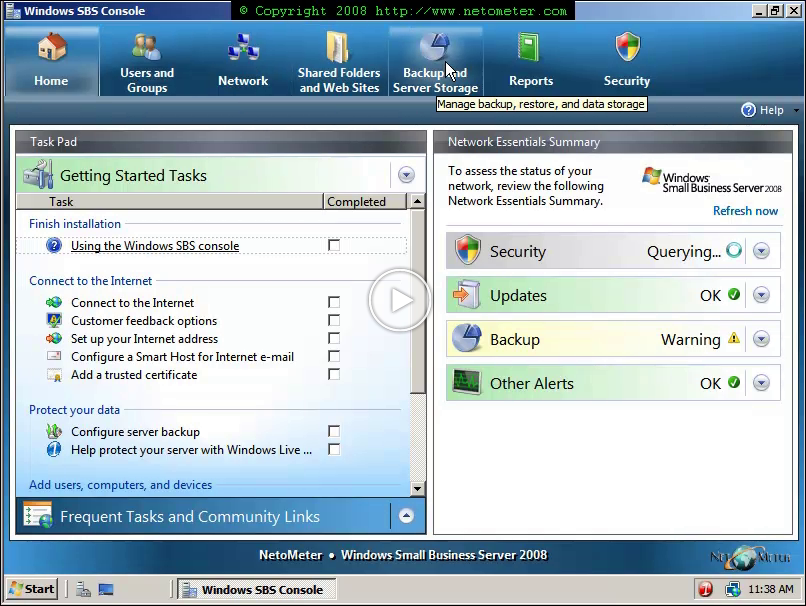
Once the installation of Small Business Server 2008 finishes successfully, you can start configuring and managing your server with the SBS console. In a series of screencasts, we will go through the obligatory initial configuration steps for the Small Business Server 2008 – the so called Getting Started Tasks.
The Getting Started Tasks are:
– CIW – Connect to the Internet Wizard
– Customer Feedback Options
– Set up your Internet Address (FQDN for the server on the Internet, e-mail domain, RWW)
– Configure a Smart Host for Internet e-mail (if you need one)
– Add a trusted certificate – we demonstrate installing GoDaddy SSL certificate. In addition, you can see how to export/import and existing certificate, if you are migrating from an existing server.
– Configure Server Backup
– Configure Windows Live OneCare
– Add a new user account
– Connect computers to your network
– Add a shred printer to the network
– Set up your Microsoft Office Live Small Business account
In the following screencast, you will see a demonstration of CIW – Connect to the Internet wizard.